How-to
How to Create a Materials List From a DIY Video
Most DIY videos never show you the full supply list. Here's how to build one before you start, so you're not halfway through a project when you find out you need mesh tape.
Quick answer
To create a materials list from a DIY video:
- Check the caption or description first for a supplies list.
- Watch once and write down every item the moment it appears or is mentioned.
- Watch again for quantities, sizes and finishes.
- Add the "hidden" items the creator used but never mentioned.
- Split it into materials (used up) and tools (kept), then cross off what you already own.
Or share the video to InspiraDo and tap ✨ Generate project with AI: it builds the materials and tools lists for you, and adds them to one shopping list.
A materials list is the difference between starting a project and starting it twice. The video makes it look like a one-afternoon job, and it usually is, as long as everything is on the table before you begin.
Materials vs. tools (and why it matters)
Before you write anything, set up two lists:
- Materials are used up by the project, so you need them every time: paint, glue, wood, fabric, tape, sandpaper, screws.
- Tools are things you keep: scissors, a utility knife, a drill, a glue gun, a level.
Materials go straight on the shopping list. Tools are a "check you have it" list, and often something you can borrow. Mixing them together is how people end up buying a third pair of scissors and forgetting the glue sticks.
How to build the list, step by step
- Start with the caption or description. YouTube creators often list supplies, sometimes with links, in the description. Blog tutorials usually have a supplies section. On TikTok and Instagram it's hit or miss, so check the comments too.
- Watch once with a notepad. Write down every item the moment it appears on screen or gets mentioned. Don't worry about amounts yet. You're just catching everything.
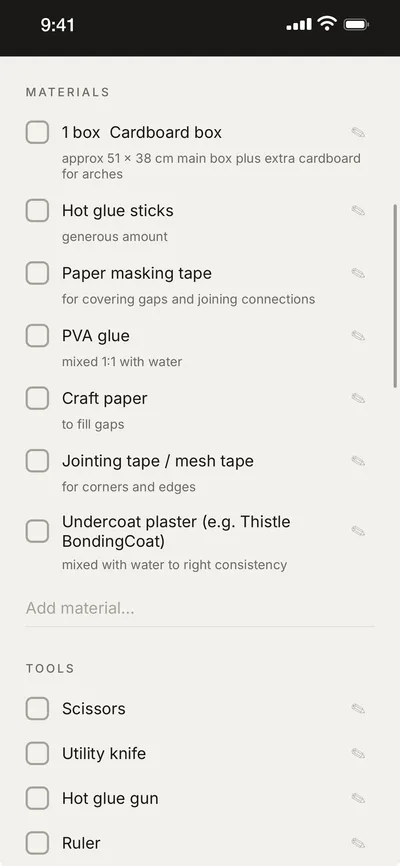
- Watch again for the specifics. Quantity, size, color, finish, and brand only where it matters: "1 cardboard box, about 51 × 38 cm," "PVA glue, mixed 1:1 with water."
- Find the hidden items. Creators rarely mention the basics they always have nearby: painter's tape, a drop cloth, rags, primer, gloves, safety glasses, a pencil. Watch the edges of the frame.
- Write down why each item is there. A short note ("to fill gaps," "for the corners") makes substitutions easy when the store doesn't have the exact thing.
- Shop your house first. Cross off what you already own before you buy anything.
- Group what's left by store. Hardware store, craft store, online. One trip each.
A free materials list template
Copy this into your notes app and fill it in for each project:
PROJECT:
SOURCE (link + creator):

MATERIALS  (qty · item · note)
-
-
-

TOOLS  (have it? ✓)
-
-

ALREADY HAVE:
TO BUY:
  Hardware store:
  Craft store:
  Online:

NOTES (drying times, substitutions):
The faster way: let InspiraDo build it
Writing a list by hand works, but it means watching every video 2–10 times with a pen. InspiraDo does that part for you:
- Share the video to InspiraDo from TikTok, Instagram, YouTube, Pinterest or Safari, or paste the link into the app.
- Tap ✨ Generate project with AI. You get a materials list and a separate tools list, with quantities and notes when the video gives them, plus the steps.
- Edit anything. Tap ✎ on a line to change it, or add what the video forgot.
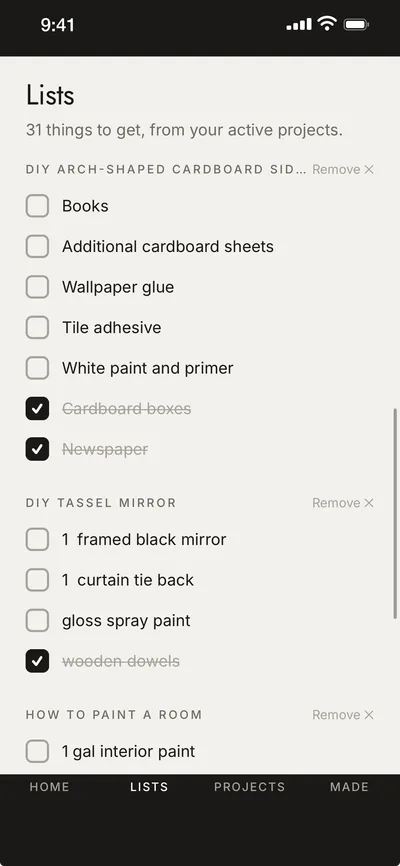
- Shop from one list. The Lists tab gathers the materials from all your active projects into one shopping list, grouped by project. Check things off in the aisle.
YouTube tutorials give the most complete lists, because the AI watches the video itself. TikToks and Instagram Reels work well when the creator talks through the supplies or lists them in the caption. If the supplies only flash up as text on screen, take screenshots and tap 📸 Add from screenshots. There's more on that in how to turn TikTok videos into step-by-step instructions.
When you can't find the exact item
- Match the job, not the brand. That's what your "why" notes are for. "Plaster to smooth the surface" has plenty of substitutes.
- Ask in the comments. Creators and other viewers often answer with alternatives they've tried.
- Write down what you actually used. Next time you make it, or someone asks how you did it, you'll know.
FAQ
What's the difference between materials and tools?
Materials get used up by the project, so you buy them every time: paint, glue, wood, tape. Tools are things you keep and reuse: scissors, a drill, a glue gun. Listing them separately tells you what to buy and what to check you already own.
Can AI make a materials list from a video?
Yes. InspiraDo builds a materials list and a tools list from a tutorial link, with quantities and notes when the video gives them. YouTube works best because the AI watches the video. For videos where the supplies only appear as text on screen, screenshot them and use Add from screenshots.
Should I buy extra materials?
Buy a little extra of anything you'll cut, mix or match, like paint, wood, fabric or tile, because a second batch can differ slightly. Keep the receipt so you can return what you don't use.
Can I combine materials from several projects into one shopping list?
In InspiraDo, the Lists tab gathers the materials from all your active projects into one shopping list, grouped by project, that you can check off in the store.
Everything on one list. Before you start.
Share any DIY video to InspiraDo and get the materials, tools and steps in one place. Free on iPhone.
